
Attackers disguise malicious packages as ones you trust. In June 2026, GitLab researchers found five malicious PyPI packages, four of them typosquats of Flask, Requests, and NumPy, that run at install time and steal CI/CD credentials. Additionally, AI coding agents now add open source dependencies on their own, often unreviewed, so developers don't have oversight into what packages may contaminate your build.
Once a malicious or vulnerable package enters your build, its code may run with the same access in your CI pipeline, and it can then reach any system your pipelines touch.
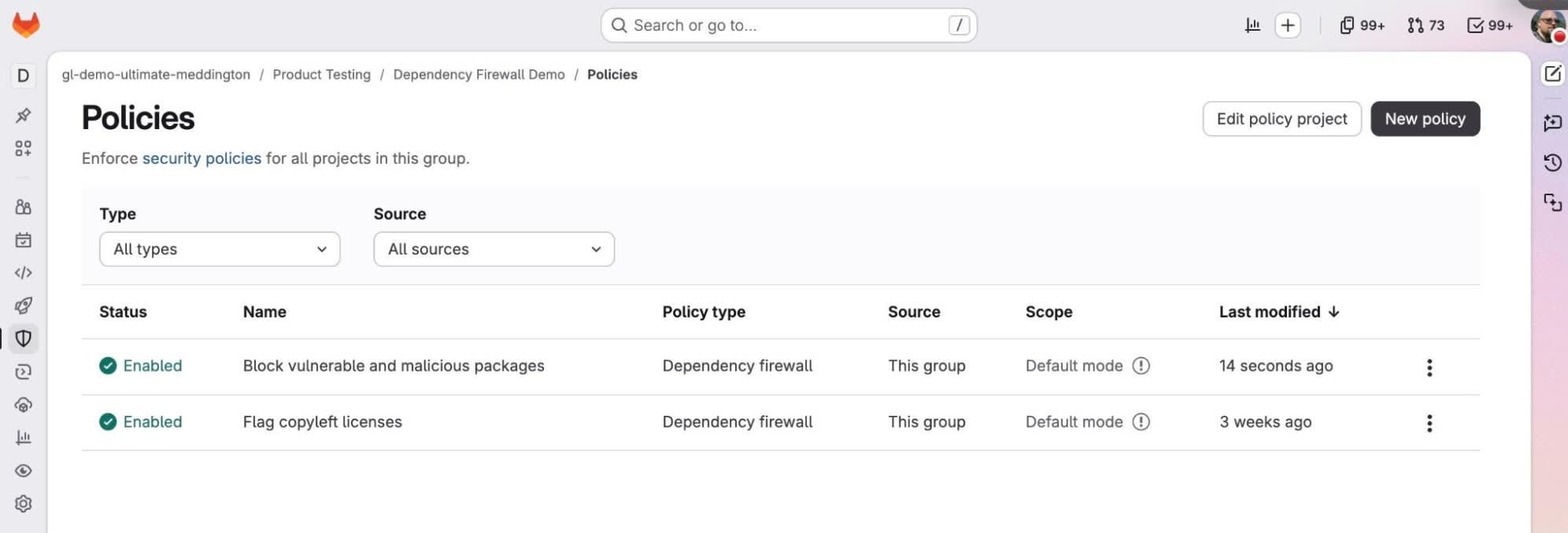
GitLab Dependency Firewall, introduced today at Transcend in early access, can block packages that match your policy, including malicious, vulnerable, and non-compliant packages, before they reach your build. Built-in governance stops risk before install, so your team doesn’t have to trace, remove, or rebuild what a policy blocks. Developers and their agents can keep pulling the dependencies they need without waiting on a manual security review, and packages that satisfy your policy requirements become part of your official build.
Block malicious packages without breaking your buildWatch the replay of our Transcend event to see demos of new platform capabilities and explore what it takes to carry the speed of agentic AI across the full software lifecycle.
Without a policy at the point of install, a bad package goes into the build first and gets caught later. Software composition analysis (SCA) scans what you've already pulled in, so by the time it flags a malicious package, a high-severity vulnerability, or a license your legal team won't accept, the dependency is installed and may have shipped in an artifact. Tracing where it went, pulling it out, and rebuilding turns a routine pipeline run into unplanned work for your engineering team.
With Dependency Firewall, you decide what's allowed into your builds before it's installed, by defining policies for:
- Malicious status — packages flagged in GitLab's malware advisory database
- Vulnerability severity — the severity you set (critical, high, medium, or low) and the number of findings you allow at that level, including zero
- License type — the licenses you allow or deny, listed by full name, and how to handle packages whose license can't be determined
- Package age — the minimum age a package must reach before it can enter a build, so a version published minutes ago can't go straight in before anyone has vetted it
Rolling out enforcement does not have to put delivery at risk. Start in warn mode, where the firewall records what a policy would catch, but lets the build continue. It leaves an audit event, a dashboard entry, and a line in the CI summary, so you can analyze whether or not to block the build.
Once you trust the policies, switch to block mode, which stops the pipeline on a match and gives the reason. When someone has a real need to get an approved package through, a logged bypass lets a designated user or token proceed, on the record.
Set policy once, or tailor it by teamA firewall that enforces only at the registry gives everyone the same policy, but that rarely fits how teams actually work. A payments service and an internal prototype carry very different risk, and your policy should treat them differently.
With Dependency Firewall, you set one policy at the top-level group and every project beneath it inherits the same rules. When a team needs something different, you can set a policy for that group or project.
You can also enforce policy at the registry, so every pull is checked, not just pulls from a pipeline. Rules live as code in a security policy project, so they are reviewed and changed through a merge request like the rest of your configuration. They inherit from the top-level group down to each project, and where rules overlap the strictest one applies. A critical service can be held above the organization's baseline, and no project drops below it.
Check a package before you pull it inA developer, or an agent working on their behalf, usually finds out a package is not allowed only when the pipeline fails. That costs a build cycle and breaks concentration, right when the work is moving.
You get the answer from GitLab Dependency Firewall before you add a dependency, in the place you already work, allowing you to pick a package that passes the first time.
Using GitLab CLI within the terminal or within a script, a command line check can identify if a package will pass or be blocked by your policy, without requiring developers to open a separate console. It covers common package managers such as npm, pip, Poetry, Maven, Gradle, and Bundler, with more coming soon.
See and prove every decisionA security leader has to be able to prove what a control is doing during an audit. A control that blocks quietly, with no record, does not answer the auditor’s question and does not build trust with the teams it governs.
You get one view of what the firewall has allowed, warned against, and blocked, with an immutable record of each decision you can hand to an auditor.
A Dependency Firewall dashboard shows activity and outcomes across the projects in scope. Every warn, block, and bypass writes an audit event that records the rule that matched, the policy behind it, and the package involved.
Get early access to GitLab Dependency FirewallYou can stop malicious, vulnerable, and non-compliant packages before they reach a build. It is compatible with GitLab Artifact Central and external registries from Sonatype Nexus Repository and JFrog Artifactory, and does not require standing up a separate tool next to your GitLab deployment. Dependency Firewall is now in early access for GitLab.com and GitLab Self-Managed customers in the Premium or Ultimate tier. Request early access today!