
Compliance is the part of software delivery that everyone agrees is important, yet nobody enjoys. It often lives in spreadsheets, screenshots, and the quiet dread of an upcoming audit. GitLab's custom compliance frameworks work differently. Instead of documenting what should be true about your projects, you define the controls once and let the platform continuously verify what is true.
In this article, you'll learn why compliance adherence matters, how to stand up a SOC 2 framework in minutes using a template, how to monitor adherence on an ongoing basis, how to enforce compliance with policies, and which standards already ship as ready-to-use templates. You'll also get a look at where AI-specific compliance templates are heading. You can watch the video below to see it in action:
Tier note: Compliance frameworks are available in Premium and Ultimate. Framework requirements and controls, the checks that power adherence reporting and the compliance status report, require Ultimate. Everything here applies to GitLab.com, GitLab Self-Managed, and GitLab Dedicated.
Why compliance adherence matters and how custom frameworks helpRegulatory and contractual obligations like SOC 2, ISO 27001, PCI DSS, and FedRAMP exist because customers, partners, and regulators need assurance that your software is built and shipped responsibly. Falling short isn't just a paperwork problem. It can block deals, trigger fines, delay product launches, and erode trust. Compliance also isn't a one-time event. A project that was compliant at audit time can drift the moment someone disables a scanner, removes branch protection, or merges without the required approvals.
Custom compliance frameworks are designed to close that gap. A compliance framework in GitLab is a label you create on a top-level group to identify projects that carry specific compliance obligations or need extra oversight. On its own that label provides organization and visibility. In Ultimate, a framework can also carry requirements made up of controls, which are automated checks against the configuration and behavior of every project the framework is applied to.
Instead of asking an engineer to confirm that static application security testing (SAST) is running, that the default branch is protected, and that merge requests need two approvals, GitLab evaluates those conditions for you on a schedule and whenever relevant project settings change. Compliance stops being a snapshot you assemble before an audit and becomes something you can watch year-round. Frameworks are created on the top-level group and inherited by all subgroups and projects beneath it. You can apply up to 20 frameworks to a single project when it needs to satisfy several standards at once.
This changes the day-to-day effort in a few ways. Compliance moves left into the development workflow, audit preparation becomes a matter of exporting a report rather than reconstructing evidence, and consistency is enforced by the platform rather than by good intentions.
Applying a template to adhere to SOC 2Building a framework by hand means defining every requirement and every control one at a time. For a standard like SOC 2 that maps to many controls, that's repetitive and error-prone. Templates solve this by giving you a complete, predefined framework, with the name, description, color, requirements, and controls all configured, and that you can adopt in a single step.
The Compliance Adherence Templates
project
hosts a library of these frameworks as JSON files, and soc2.json is one of them.
There are two ways to get a template into your group.
Option A: Create from a template in the Compliance center
You can create a framework directly from a built-in template without leaving the UI:
- Go to your top-level group.
- In the sidetab, select Secure > Compliance center.
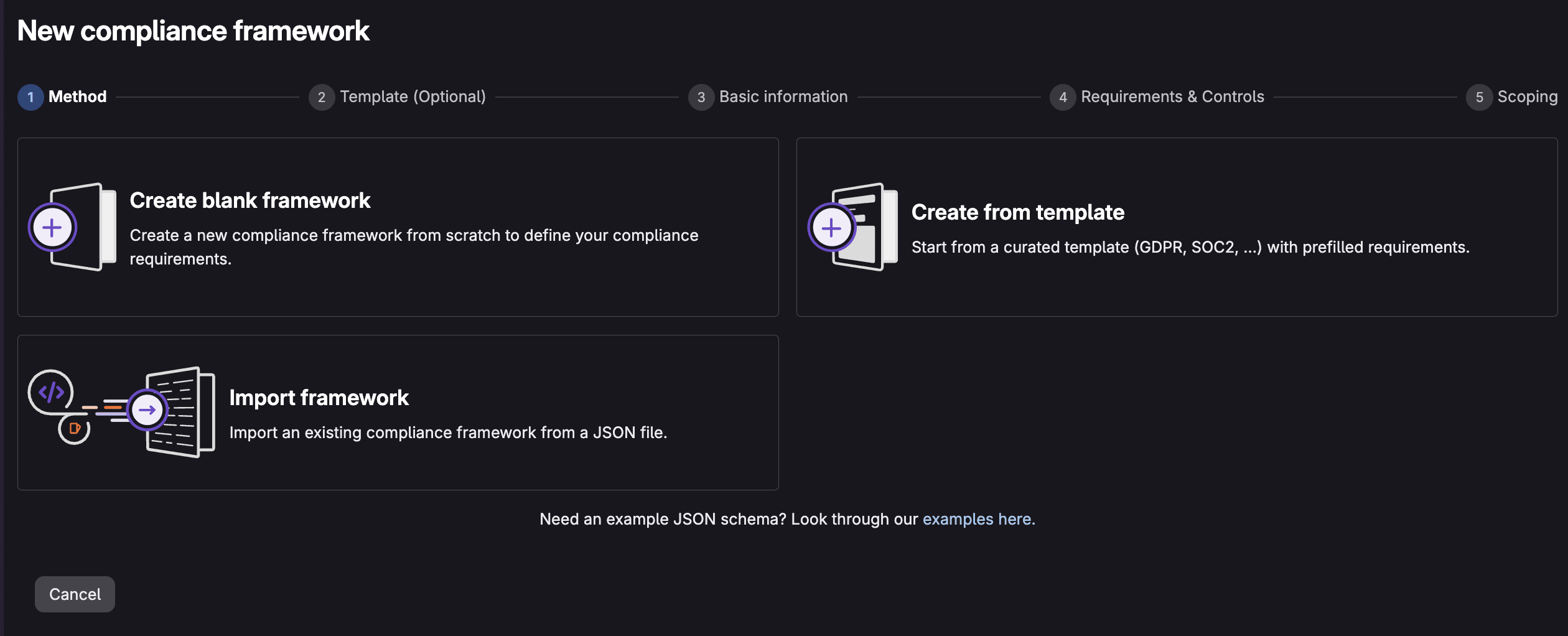
- Click the New framework button.
- Choose Create from template.
- Scroll down to the SOC 2 template, and select View details to see the controls the template implements.
- Press the Use template button to implement the SOC 2 template. customize the name, description, and color if you'd like. Select Next when complete.
- Preview the included requirements and controls.
- Apply the framework to the groups/projects that require it.
- Press the Create framework button.
Your framework is created and will be applied to the groups/projects you selected.
Option B: Import the SOC 2 JSON template
If you're on a GitLab version without the in-product template picker, or you want to keep the template under version control and tweak it first, import the JSON directly:
- Go to the Compliance Adherence Templates
project
and download
soc2.json. - Go to your top-level group.
- Select Secure > Compliance center.
- On the Frameworks tab, select New framework, then Import framework.
- Choose the
soc2.jsonfile from your local system. - When the import succeeds, the SOC 2 framework appears in your frameworks list.
A framework only does something once it's attached to projects. Make sure you apply this framework to the groups/projects where it will be used.
Note: Imports fail with an Unable to determine the correct upload URL error if a framework with the same name already exists. Rename or remove the existing one first.
Edit and apply the framework to your projects
You can also edit the newly created framework as well as apply it to additional groups/projects:
- In Secure > Compliance center, open the Frameworks tab.
- Hover over the SOC 2 framework and select Edit Framework.
- In the Requirements & Controls section, under Action, select the ... > Edit.
- Perform any necessary changes to the requirements or controls.
- In the Scoping section, select the groups/projects that fall under SOC 2.
- Select Update Framework.
If you want every new project in the group to inherit SOC 2 automatically, set the framework as the group default in the Basic information section. The framework will then be applied to all newly created and imported projects going forward.
What the SOC 2 template actually checks
Once applied, the SOC 2 framework maps GitLab controls to the relevant Trust Services Criteria. A few highlights:
SOC 2 criterionWhat it coversGitLab controls appliedCC3.2Identifying vulnerabilities in system componentsDependency scanning, container scanning, DAST, API security runningCC5.1Segregation of dutiesAt least two approvals; author and committer approvals forbidden; approval rules locked from editingCC6.6Protecting authentication credentials in transitSecret detection runningCC6.8Detecting unauthorized or malicious software changesDefault branch protectedCC7.1Detecting new vulnerabilities through scanningDependency, container, SAST, DAST, and API security scanning runningCC8.1Authorizing, testing, and approving changesSAST, DAST, secret detection running; default branch protected; at least two approvalsAfter the framework is applied to a project, GitLab runs a compliance scan and begins reporting on whether each control passes. No manual evidence gathering required.
Continuously viewing compliance statusApplying a framework is only half the value. The other half is knowing, at any moment, where you stand. That's the job of the compliance status report (Ultimate), found in your top-level group under Secure > Compliance center > Status.
The report surfaces the most recent instances where projects do and do not adhere to a framework's controls, so you can spot and close gaps fast. Each row tells you:
- Status: whether a requirement is in or out of compliance
- Requirement: the specific controls in a requirement that failed (for example, "At least two approvals")
- Framework: which framework the control belongs to (for example, SOC 2)
- Project: where the non-adherence was found
- Last Scanned: when the gap was first recorded
- Fix Suggestions: information on how to resolve the issue
You can filter by project, framework, or requirement, jump straight into a project's compliance detail view, and export the whole report (delivered to your inbox as an attachment) when an auditor asks for evidence.
Behind the scenes, scans that refresh the report are triggered automatically when a framework is added to a project, when an associated framework's requirements change, and on a recurring 12-hour schedule. Results typically appear five to ten minutes after a scan runs. This means compliance drift becomes visible within hours rather than at the next annual audit. To view the report, you'll need to be an administrator, or have the Security Manager or Owner role for the group.
Adhering to compliance via policiesReporting tells you when something is wrong. Policies stop the wrong thing from happening in the first place. This is where compliance frameworks move from observation to enforcement, and it's an Ultimate capability tied to the framework label.
A compliance framework can act as the scope for Security policies. Scan execution policies, Pipeline execution policies, and merge request approval policies can be scoped to a compliance framework, so every project carrying that label automatically inherits them. For example, you can require that SAST, secret detection, and dependency scanning run on the default branch, and require approval from a designated security team before a merge request that introduces new critical vulnerabilities can be merged. Because the policy is bound to the framework rather than to individual projects, adding a new project to the framework instantly brings it under the same guardrails.
The pieces work together. The framework defines the obligation, controls and the status report measure adherence, and policies and compliance pipelines enforce the behavior. You're not just documenting that SOC 2 requires two approvals and running scanners. You're making it difficult to ship anything that violates those requirements. When a control fails, the status report flags it. When a policy is in place, the non-compliant change is blocked before it merges.
Available templatesGitLab ships a growing library of predefined framework templates in the Compliance Adherence Templates project, each mapping a recognized standard to GitLab controls. As of publication, these include:
StandardTemplate fileCIS Critical Security Controls v8.1cis_csc_v8-1.jsonCSA Cloud Controls Matrix v4csa_ccm_v4.jsonCyber Essentialscyber_essentials.jsonDORA (Digital Operational Resilience Act)dora.jsonFedRAMP Low / Moderate / High (Rev 5)fedramp_low_r5.json, fedramp_moderate_r5.json, fedramp_high_r5.jsonIRAP Official / Protected / Secret / Top Secretirap_official.json, irap_protected.json, irap_secret.json, irap_top_secret.jsonISMAPismap.jsonISO 27001:2022iso_27001:2022.jsonNIS 2nis_2.jsonNIST 800-53 Rev 5nist_800-53_r5.jsonNIST 800-171 Rev 3 (CMMC)nist_800-171_r3_cmmc.jsonNIST CSF 2.0nist_csf_2.jsonNIST SP 800-218 (SSDF)nist_800-218_v1-1.jsonPCI DSS v4.0.1pci_dss_v4-0-1.jsonSOC 2soc2.jsonTISAXtisax.jsonEach template's exact requirement-to-control mapping is documented in the compliance
standards
reference. You can import any of them as-is, or use them as a starting point. Export a framework as
JSON, adjust the requirements and controls to match your organization's interpretation of a
standard, and re-import. The JSON schema is straightforward. A framework has a name,
description, color, and an array of requirements, each with its own controls and evaluation
expression. That makes templates easy to keep in version control and share across groups.
The compliance standards covered today were largely written for traditional software. As organizations embed AI into their products and their own development workflows, a new class of obligations is emerging around governing how AI systems are built, approved, and monitored. Examples include the EU AI Act, ISO/IEC 42001, and the NIST AI Risk Management Framework.
GitLab is exploring AI governance compliance templates (Epic #16808, with planning tracked in Work item #22336) to extend the same template-driven model into this space. The intent is to let teams adopt an AI-governance framework as easily as they adopt SOC 2 today, with predefined requirements and controls that map to AI-specific obligations, applied to the projects that build or deploy AI capabilities, and surfaced through the same compliance status report.
It's worth keeping one distinction in mind. Compliance is the state of meeting a defined set of requirements, while governance is the ongoing capability to keep AI systems compliant as both the systems and the rules evolve. GitLab's broader direction pairs AI-assisted detection with human-in-the-loop approval and auditable, policy-based enforcement, so AI findings inform decisions but accountable humans and measurable controls still gate what ships. AI-specific templates would be the onramp, giving you a fast way to encode emerging AI requirements into the same framework, control, status report, and policy machinery you're already using for everything else.
SummaryCustom compliance frameworks let you define your obligations once and have GitLab continuously verify them. Templates take the manual setup out of getting started, so a SOC 2 framework is a few clicks or a single JSON import away. The compliance status report keeps adherence visible on a 12-hour cadence, and security policies plus compliance pipelines turn that visibility into enforcement. With a library of standards already available and AI-specific templates on the horizon, the path from "we should be compliant" to "we can prove we are, continuously" is shorter than it's ever been.
Learn more with our compliance frameworks documentation and try the custom compliance frameworks click-through demo.
This blog post contains "forward‑looking statements" within the meaning of Section 27A of the Securities Act of 1933, as amended, and Section 21E of the Securities Exchange Act of 1934. Although we believe that the expectations reflected in these statements are reasonable, they are subject to known and unknown risks, uncertainties, assumptions and other factors that may cause actual results or outcomes to differ materially. Further information on these risks and other factors is included under the caption "Risk Factors" in our filings with the SEC. We do not undertake any obligation to update or revise these statements after the date of this blog post, except as required by law.